
Introduction:
Have you ever faced a situation where a PostgreSQL query that usually finishes in a few seconds suddenly starts taking several minutes? At the same time, you notice high disk I/O, increasing response times, although there are no blocking sessions or deadlocks. under such circumstances, If PostgreSQL logs reveal hundreds of messages similar to:
temporary file: path "base/pgsql_tmp/...", size 650 MBthe real culprit could be something less obvious—temporary file generation due to insufficient work_mem.
In PostgreSQL, operations such as ORDER BY, GROUP BY, DISTINCT and Hash Joins require work memory to process results. When the required memory exceeds the configured work_mem, PostgreSQL doesn’t terminate the query. Instead, it writes the excess intermediate data to temporary files on disk, a process commonly referred to as disk spilling.
A common solution to avoid disk spilling is to increase the work_mem setting..So that queries can process more data in memory instead of creating temporary files. However, this isn’t always the best approach. Since work_mem is allocated for each query operation, multiple queries running at the same time can consume a large amount of memory. If the server doesn’t have enough RAM, it can experience memory pressure, become slow, or even crash.
To demonstrate this behavior, I recreated a common production scenario in which a query generates temporary files due to insufficient work_mem. By intentionally configuring a low work_mem value and executing a large sorting query, PostgreSQL spilled intermediate data to disk. As expected, the additional disk read and write operations increased the query execution time.
Setting Up the Test Environment
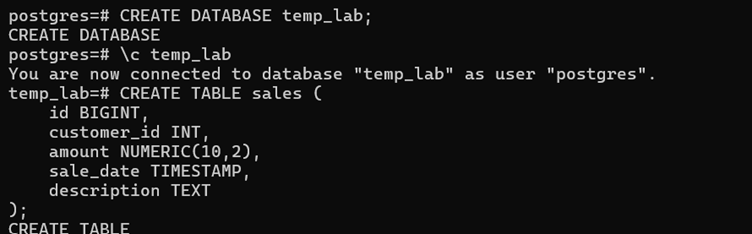
To explain how PostgreSQL generates temporary files, I first created a dedicated test database named temp_lab. Using a separate database allows the experiment to be performed without affecting any existing databases and provides an isolated environment for testing different work_mem configurations and query execution plans.
The following commands were used to create and connect to the database
CREATE DATABASE temp_lab; \c temp_labAfter connecting to the database, I created a table named sales that will be used throughout this lab
CREATE TABLE sales (

    id BIGINT,

    customer_id INT,

    amount NUMERIC(10,2),

    sale_date TIMESTAMP,

    description TEXT

);

);
Populating the Table with Sample Data
To simulate a real-world workload, I populated the sales table with 10 million records using PostgreSQL’s generate_series() function. The generated data includes random customer IDs, sale amounts, sale dates, and descriptions, creating a sufficiently large dataset to observe PostgreSQL’s behavior during memory-intensive operations.
INSERT INTO sales
SELECT
    gs,
    (random()*100000)::int,
    round((random()*100000)::numeric,2),
    now() - ((random()*365)::int * interval '1 day'),
    md5(random()::text)
FROM generate_series(1,10000000) gs;
After the data was loaded, I verified the number of rows.
SELECT COUNT(*) FROM sales;
Next, I checked the size of the table.
SELECT pg_size_pretty(pg_relation_size('sales'));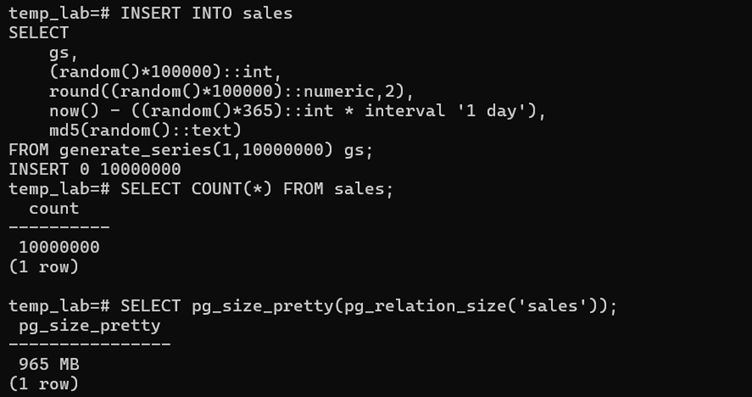
Updating Table Statistics
After inserting 10 million rows into the sales table, I executed the ANALYZE command to update PostgreSQL’s table statistics.

Here is the youtube video :
Why to run ANALYZE?
When a large amount of data is inserted, PostgreSQL’s query planner may not have accurate information about the table. Running ANALYZE collects statistics such as the number of rows and the distribution of data, allowing the query planner to generate a more accurate and efficient execution plan.
Configuring work_mem to Generate Temporary Files:
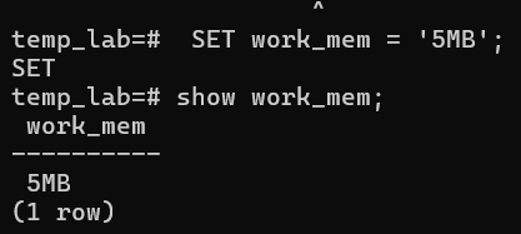
I intentionally set the work_mem setting to 5 MB. This small memory allocation forces PostgreSQL to spill intermediate data to disk whenever a query requires more than 5 MB of working memory for operations such as sorting or hashing.
Enabling Temporary File Logging
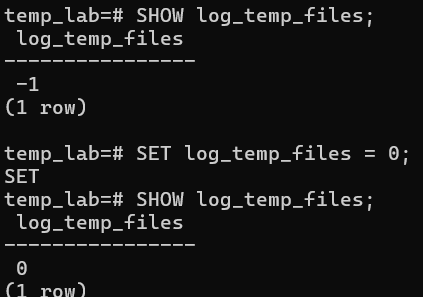
By default, PostgreSQL sets the log_temp_files parameter to -1, which means temporary files are not logged.
Since our objective is to focus on understanding temporary file generation, setting log_temp_files to 0 allowed us to capture every temporary file created during query execution. This helped verify that the query was spilling data to disk and also showed the size of the temporary files that got generated.
Capturing Temporary File Generation:
To observe temporary file generation during query execution, I first verified the PostgreSQL logging configuration and identified the location where PostgreSQL stores its log files.
temp_lab=# SHOW log_directory;

 log_directory

---------------

 log

(1 row)

temp_lab=# SHOW data_directory;

       data_directory

-----------------------------

 /var/lib/postgresql/18/main

(1 row)
I opened the PostgreSQL log file in a separate terminal session using tail -f to continuously monitor new log entries generated during query execution.
tail -f /var/lib/postgresql/18/main/log/postgresql-2026-07-21_063944.logExecuting a Memory-Intensive Query:
Then i executed the following sorting operation to create a disk spill scenario..
EXPLAIN (ANALYZE, BUFFERS)

SELECT *

FROM sales

WHERE customer_id <= 5000

ORDER BY description;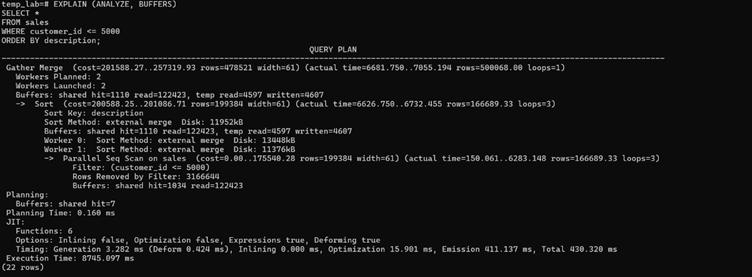
The query first filters rows where customer_id <= 5000 and then sorts the resulting dataset by the description column. Although only a subset of the table is sorted, the operation still required more memory than the configured work_mem of 5 MB. As a result, PostgreSQL could not perform the sort entirely in memory and automatically switched to an external merge sort, creating temporary files of approximately 11–13 MB per worker. This introduced additional disk I/O and increased the overall query execution time to approximately 8.7 seconds.
Observing Temporary File Creation:
During query execution, the PostgreSQL log captured temporary file generation

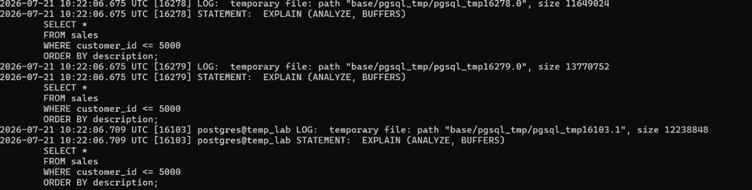
These log entries confirm that PostgreSQL spilled intermediate query data to temporary files because the available work_mem was insufficient for the sorting operation.
While the query was executing,The log shows that temporary files were created under the base/pgsql_tmp/ directory..we can also monitor the temp files generation using a system view..
SELECT *

FROM pg_stat_database

WHERE datname = 'temp_lab';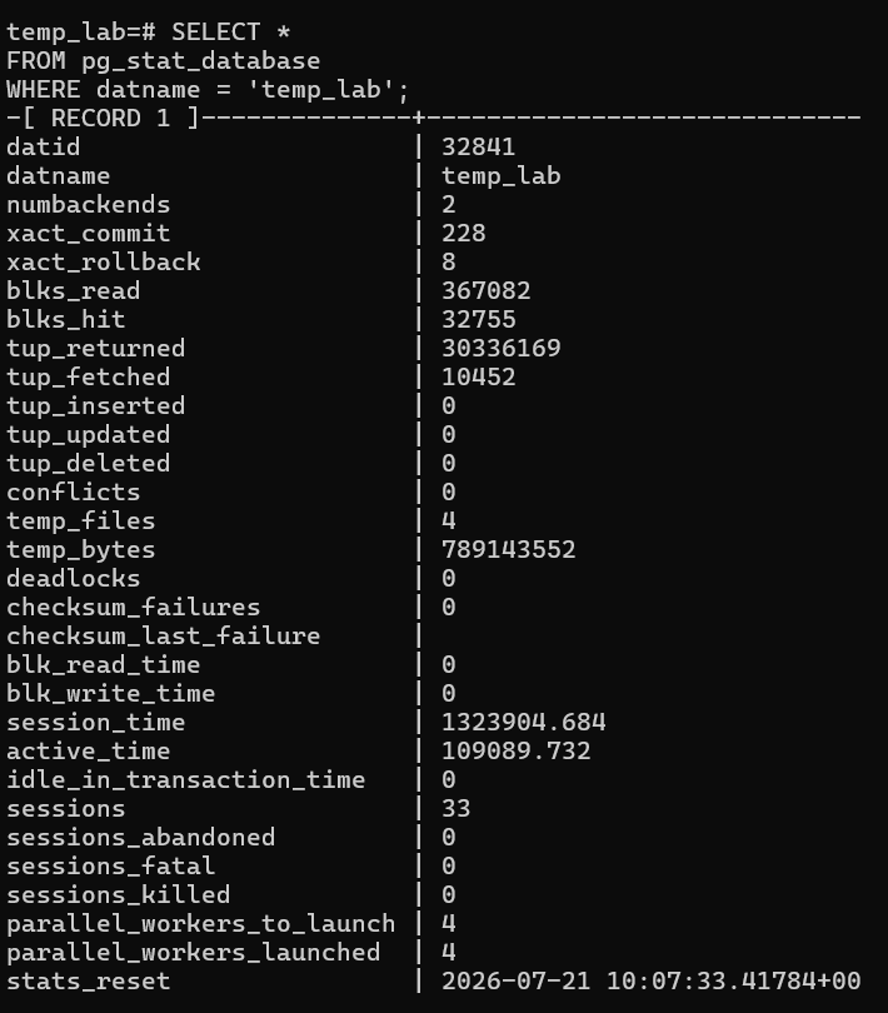
Resolution Approach: Increasing work_mem to Reduce Temporary File Generation
Temporary file generation can often be minimized by either optimizing the query execution plan or adjusting the work_mem setting. In this blog, I focused on increasing work_mem to provide sufficient memory for the sort operation, allowing PostgreSQL to process more data in memory and reduce disk spilling.
To assess the effectiveness of this approach, I increased the work_mem setting from 5 MB to 64 MB and re-executed the same query. Running the identical workload under a higher memory allocation allowed me to evaluate its impact on the execution plan, temporary file generation, and overall query performance.

temp_lab=# EXPLAIN (ANALYZE, BUFFERS)

SELECT *

FROM sales

WHERE customer_id <= 5000

ORDER BY description;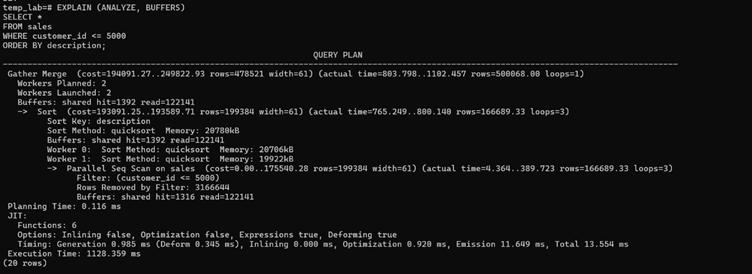
Unlike the previous execution, PostgreSQL completed the sort operation using quicksort, an in-memory sorting algorithm, without creating temporary files on disk. Each parallel worker used approximately 20 MB of memory, which was well within the configured work_mem limit. As a result, the execution plan no longer shows temporary reads or writes, confirming that the sort operation was performed entirely in memory. This significantly reduced disk I/O and improved the query execution speed.The query execution time was reduced from 8.7 seconds to approximately 1.1 seconds
Conclusion:
This blog demonstrates how the work_mem setting directly influences PostgreSQL’s sorting behavior and query performance. With work_mem set to 5 MB, PostgreSQL was unable to perform the sort operation entirely in memory, resulting in an external merge sort, temporary file generation, and additional disk I/O. After increasing work_mem to 64 MB, the same query completed using quicksort, an in-memory sorting algorithm, eliminating disk spills and reducing the execution time from approximately 8.7 seconds to 1.1 seconds. While increasing work_mem can significantly improve the performance of memory-intensive operations such as large sorts and hash aggregations, it should be tuned carefully based on the available system memory and workload;larger sorting operations may require a higher work_mem value to avoid temporary file generation.