
Database migration isn’t always about moving an entire source database to the target platform.
In one migration scenario, the source Oracle database held roughly 5 TB of transactional data spanning nearly two years. The business requirement, however, was to migrate only the most recent six months of data into the new PostgreSQL environment.
Migrating the full 5 TB dataset and deleting the older data afterward would have meant:
- A significantly longer migration window
- Higher network and I/O consumption
- Additional PostgreSQL storage requirements
- More WAL activity and database load during the import
- Extra validation effort for historical data the application would never use
Instead, we filtered the data during extraction from Oracle, so that only the required six-month window was transferred to PostgreSQL in the first place. Ora2Pg's WHERE configuration directive supports exactly this — filtering globally or on a table-by-table basis.
The Requirement
The source Oracle database contained approximately:
- 5 TB of data
- Nearly two years of transactional history
The target PostgreSQL environment only needed:
- The latest six months of transactional data
- All required parent/reference data
- Referential integrity between parent and child tables
For this walkthrough, assume the migration cutoff date is March 1, 2026 (the most recent six months as of September 1, 2026):
WHERE transaction_date >= DATE '2026-03-01'The cutoff date should always be derived from the actual business requirement for a given migration — never hard-coded as a fixed date across projects.
Every filter in this walkthrough is applied on a date column TXN_DATE, PAYMENT_DATE, LOG_DATE — not on txn_id or any other primary-key/sequence range. ID values aren’t a reliable proxy for chronology: sequences can be reused across environments, backfilled, or assigned out of order (especially with CDC or batched loads), so a numeric ID range can silently include or exclude the wrong rows. The date column is the only thing tied directly to the business requirement (“last six months”), so it’s the only thing the filter should key off.
Why Filter During Extraction?
One approach would be to migrate the complete 5 TB database, load everything into PostgreSQL, and then delete the historical data. That approach unnecessarily transfers and stores data that gets discarded immediately afterward.
Filtering at the Oracle/ora2pg extraction stage instead avoids moving rows that were never going to be kept:
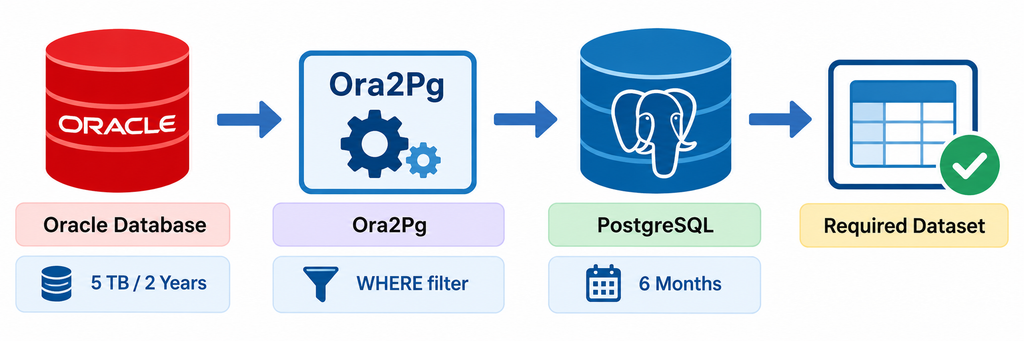
Step 1: Source Tables in Oracle
Two tables illustrate the pattern:
- ACCOUNTS — parent/reference table
- TRANSACTIONS — high-volume transactional table
Oracle ACCOUNTS table
CREATE TABLE accounts (
    account_id   NUMBER(10) PRIMARY KEY,
    account_name VARCHAR2(100),
    created_date DATE
);
Oracle TRANSACTIONS table
CREATE TABLE transactions (
    txn_id     NUMBER(12) PRIMARY KEY,
    account_id NUMBER(10) REFERENCES accounts(account_id),
    txn_date   DATE,
    amount     NUMBER(12,2)
);
TRANSACTIONS contains data spanning nearly two years:
| TXN_ID | ACCOUNT_ID | TXN_DATE | AMOUNT |
| 9001 | 201 | 2024-09-14 | 1200.00 |
| 9002 | 201 | 2025-01-30 | 850.50 |
| 9003 | 202 | 2025-06-05 | 430.00 |
| 9004 | 202 | 2026-04-18 | 2100.75 |
| 9005 | 203 | 2026-07-22 | 990.00 |
| 9006 | 201 | 2026-08-01 | 1750.20 |
Since only records from March 1, 2026, onward should migrate, transactions 9001, 9002, and 9003 are excluded.
Step 2: Identifying Which Tables to Filter
A common mistake is applying the same date filter to every table. Not every table has the same date column, and not every table should be filtered at all:
| Table | Filter column |
| TRANSACTIONS | TXN_DATE |
| PAYMENT_HISTORY | PAYMENT_DATE |
| AUDIT_LOG | LOG_DATE |
| ACCOUNTS | Keep all rows |
| CUSTOMERS | Keep required reference rows |
| PRODUCTS | Keep required reference rows |
This needs to be worked out table by table, based on business requirements, table relationships, foreign keys, application dependencies, and data-retention rules.
Step 3: Configure Ora2Pg
Ora2Pg’s WHERE directive filters exported table data. The documented syntax for a table-specific condition is:
WHERE TABLE_NAME[WHERE_CLAUSE]A single global condition can also be applied across all exported tables. The key detail is the TABLE_NAME[condition] bracket syntax — not a bare WHERE TABLE_NAME “condition” form.
Here’s a representative ora2pg.conf for this migration:
####################  Ora2Pg Configuration file   #####################
#------------------------------------------------------------------------------
# INPUT SECTION (Oracle connection)
#------------------------------------------------------------------------------
ORACLE_HOME     /opt/oracle/instantclient_21_15
ORACLE_DSN      dbi:Oracle:host=<oracle-host>;service_name=ORCLPDB1;port=1521
ORACLE_USER     <oracle-user>
ORACLE_PWD      <oracle-password>

# Schema settings
SCHEMA          HR
COMPILE_SCHEMA  1
EXPORT_SCHEMA   1
TYPE            COPY
DATA_LIMIT      1000

# IMPORTANT: specify tables in dependency order
TABLES          ACCOUNTS TRANSACTIONS PAYMENT_HISTORY AUDIT_LOG

# High-volume transactional table
WHERE TRANSACTIONS[TXN_DATE >= TO_DATE('01-MAR-2026','DD-MON-YYYY')]
# Other transactional tables
WHERE PAYMENT_HISTORY[PAYMENT_DATE >= TO_DATE('01-MAR-2026','DD-MON-YYYY')]
WHERE AUDIT_LOG[LOG_DATE >= TO_DATE('01-MAR-2026','DD-MON-YYYY')]

# Drop and recreate foreign keys
DROP_FKEY               1

# Truncate tables before loading (critical for a re-runnable load)
TRUNCATE_TABLE           1

# Disable triggers during load
DISABLE_TRIGGERS         1

# Performance — load sequentially to respect dependency order
PARALLEL_TABLES 1
JOBS            1

# Debug mode
DEBUG           1

#------------------------------------------------------------------------------
# OUTPUT SECTION (PostgreSQL connection)
#------------------------------------------------------------------------------
PG_DSN          dbi:Pg:dbname=<target-db>;host=<postgres-host>;port=5432
PG_USER         <postgres-user>
PG_PWD          <postgres-password>
PG_VERSION      16
PG_SCHEMA       public

# Other important settings
DROP_IF_EXISTS      0
USER_GRANTS         1
NULL_EQUAL_EMPTY    1

# Data type mappings
DATA_TYPE       DATE => TIMESTAMP
Note: replace the connection details, credentials, and hostnames above with your own before using this never publish a config with real DSNs or passwords, even example-looking ones.
Step 4: Handling Parent and Child Tables
This is the part that’s easiest to get wrong.
TRANSACTIONS has a foreign key to ACCOUNTS:
ACCOUNTS
   |
   | account_id
   |
   v
TRANSACTIONS
Suppose the source ACCOUNTS data is:
| ACCOUNT_ID | ACCOUNT_NAME | CREATED_DATE |
| 201 | Ramesh Traders | 2024-05-10 |
| 202 | Global Logistics | 2024-09-22 |
| 203 | Sunrise Foods | 2026-05-01 |
Applying the same six-month filter here
WHERE created_date >= DATE '2026-03-01'Excluding those accounts would break referential integrity. So the parent table doesn’t automatically inherit the child table’s date filter:
- ACCOUNTS → keep required parent records (no six-month filter)
- TRANSACTIONS → filter by TXN_DATE
The decision has to be made per table, based on its dependencies and the actual business requirement.
Step 5: Finalize the Filtering Strategy
# Parent/reference table — no six-month filter
# ACCOUNTS

# High-volume transactional table
WHERE TRANSACTIONS[TXN_DATE >= TO_DATE('01-MAR-2026','DD-MON-YYYY')]

# Other transactional tables
WHERE PAYMENT_HISTORY[PAYMENT_DATE >= TO_DATE('01-MAR-2026','DD-MON-YYYY')]
WHERE AUDIT_LOG[LOG_DATE >= TO_DATE('01-MAR-2026','DD-MON-YYYY')]
Step 6: Run the Ora2Pg Data Export
ora2pg -c ora2pg.conf
Or, with an explicit config path:
ora2pg -c /path/to/ora2pg.confThe COPY export type produces data in PostgreSQL COPY format (ora2pg also supports INSERT and other export types). The generated output loads directly into PostgreSQL.
Step 7: Result After Migration
ACCOUNTS retains the required parent records:
| ACCOUNT_ID | ACCOUNT_NAME | CREATED_DATE |
| 201 | Ramesh Traders | 2024-05-10 |
| 202 | Global Logistics | 2024-09-22 |
| 203 | Sunrise Foods | 2026-05-01 |
TRANSACTIONS contains only the required six-month window:
| TXN_ID | ACCOUNT_ID | TXN_DATE | AMOUNT |
| 9004 | 202 | 2026-04-18 | 2100.75 |
| 9005 | 203 | 2026-07-22 | 990.00 |
| 9006 | 201 | 2026-08-01 | 1750.20 |
Every ACCOUNT_ID in TRANSACTIONS has a matching record in ACCOUNTS, and referential integrity is maintained.
Step 8: Validate the Filtered Data
Validation has to compare the same logical dataset on both sides.
Oracle
SELECT COUNT(*)
FROM transactions
WHERE txn_date >= DATE '2026-03-01';
PostgreSQL
SELECT COUNT(*)
FROM transactions;
Key Lessons
- Don’t apply one filter to every table. Different tables have different date columns and different retention requirements (TXN_DATE, PAYMENT_DATE, LOG_DATE — or no filter at all, as with ACCOUNTS).
- Understand parent–child relationships first. Filtering a child table without checking its parents can create foreign-key violations.
- Filter at extraction time, not after the fact it avoids transferring and then discarding data you never needed in PostgreSQL.
- Validate the same logical dataset. Comparing a full-table Oracle count against a filtered PostgreSQL count will never match when only a subset was migrated always scope the Oracle-side query to the same filter used for the migration.
The Bigger Lesson
A successful migration isn’t just about moving data between platforms. It requires understanding business requirements, data-retention rules, table relationships, referential integrity, transformation rules, migration scope, and validation criteria.
Ora2Pg moves data and structure — it doesn’t know your business rules. Those rules have to be applied deliberately, validated explicitly, and tested against real data.
Project highlights
- Migrated ~1.5 TB of production data from Oracle to PostgreSQL
- Addressed semantic differences between Oracle and PostgreSQL data types
- Reduced a 5 TB, two-year dataset to a targeted six-month dataset of 1.5 TB using ora2pg filtering
- Preserved referential integrity between filtered transactional tables and required parent tables
- Validated the migrated subset using filter-matched row counts
- Cut unnecessary data transfer by filtering during extraction rather than after load
In selective historical-data migration, the hardest part usually isn’t the tooling , it’s deciding what data actually needs to exist in the target system, and proving the migrated subset is correct.