
When I started learning about PostgreSQL job schedulers, I came across tools like pg_cron and pgAgent. These tools are useful when we need to run a particular job at a specific time.
For example, we may want to run VACUUM every night at 12 AM. We can simply schedule the command, and the scheduler executes it at the required time.
But what happens when the requirement becomes more complex?
Suppose we have an ETL process where we need to:
Extract data → Transform data → Load data → Send notification
If we want to run a sequence of tasks using pg_cron or the OS level cron jobs, we cannot simply run four independent jobs. We need to define the sequence and track the status of execution at each step before branching to the next step.
This is where pg_timetable becomes more useful.
pg_timetable – Advanced Job Scheduling
pg_timetable is an advanced PostgreSQL job scheduler that goes beyond simply running a command at a specific time. Traditional schedulers such as pg_cron or OS-level cron are mainly designed for independent jobs, for example, running VACUUM every night. pg_timetable, on the other hand, it allows multiple tasks to be connected together as a chain, creating a complete workflow.
A chain represents the overall workflow, while tasks represent the individual operations within that workflow. Tasks can be executed in a specific order, and the result of one task can determine what happens next. For example, an ETL workflow can extract → transform → load → notify. If the extraction succeeds, the next task can continue; if it fails, an error-handling task can be triggered instead.
pg_timetable also supports autonomous tasks, where a task can run independently without making the main workflow wait for its completion. This makes pg_timetable useful for complex database automation where task sequencing, success/error handling, parallel execution and workflow control are required.
In simple terms, traditional schedulers mainly answer “When should this command run?”, while pg_timetable can answer both “When should it run?” and “What should happen next?”
Main features
- Tasks can be arranged in chains
- Each task executes SQL, built-in or executable commands
- Parameters can be passed to tasks
- Missed chains (possibly due to downtime) can be retried automatically
- Support for configurable repetitions
- Built-in tasks such as sending emails, downloading, importing files, etc.
- Fully database-driven configuration
- Full support for database-driven logging
- Enhanced cron-style scheduling
- Optional concurrency protection
- Chain and task definitions can be enabled or disabled without deleting them
- YAML-based chain definitions for easy configuration
- OpenTelemetry tracing and metrics export (opt-in)
- Official Docker images published for both linux/amd64 and linux/arm64
When we start working with pg_timetable, the first thing we need to understand is that it is a job scheduler for PostgreSQL. Its purpose is to automate tasks like inserting data, updating records, running stored procedures, performing maintenance, or executing shell commands that need to happen at a particular time or at pre-defined intervals.
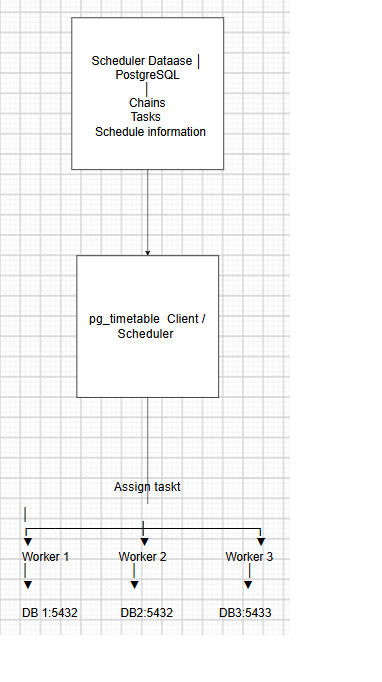
The first thing I look at is the Scheduler Database. This is where pg_timetable keeps the information needed to manage jobs. It contains the definitions of chains, tasks, schedules, and execution-related information. So, before pg_timetable can decide what to execute, it needs to know what jobs have been configured.
Once the scheduler database is ready, we create a chain. A chain represents a complete workflow or a group of related operations. For example, suppose every night we want to perform three operations:
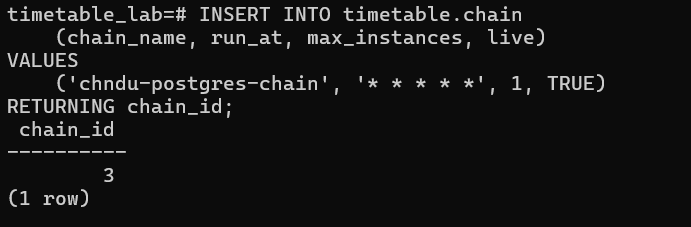
Those * * * * every minute, of every hour, on every day, of every month, regardless of the day of the week.
For example,If you want the chain to run every day at 10:30 PM: then it could be 30 ,22 ,*,*.
Insert Data → Update Data → clean the data
Instead of treating these as unrelated jobs, we put them into one chain. The chain gives pg_timetable the overall workflow.
After creating the chain, we add Tasks to it. A task is the actual piece of work that needs to be performed. For example, Task 1 may execute an INSERT, Task 2 may execute an UPDATE, and Task 3 may execute a stored procedure. The task order tells pg_timetable which task comes first, which comes next, and so on.
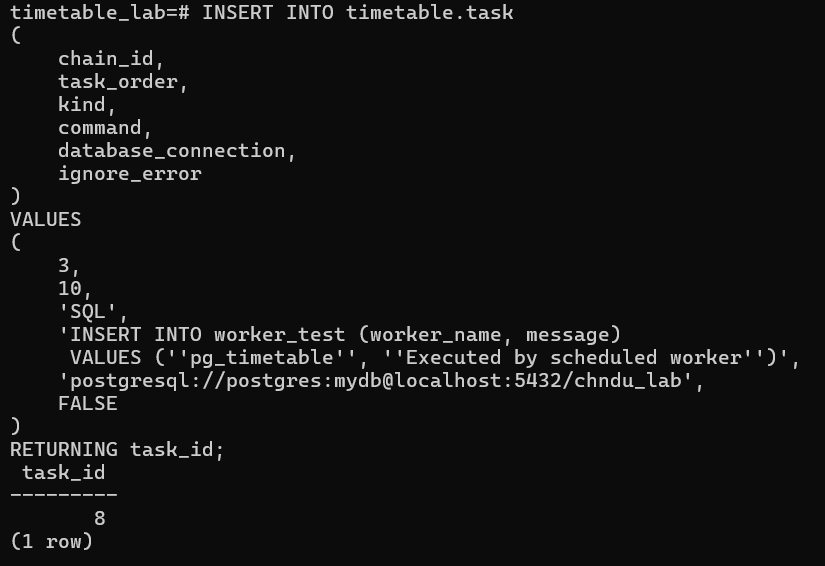
Now pg_timetable knows what work needs to be done, but it still needs to know when to do it. This is where the Schedule comes into the picture. We can tell pg_timetable to run the chain every day at 10 PM, every 5 minutes, or according to the required schedule.
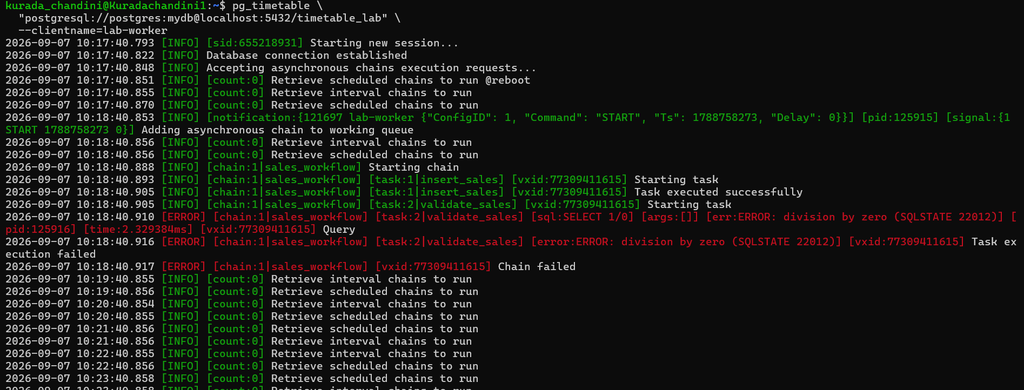
Once the schedule is configured, we start the pg_timetable client. The pg_timetable client is a separate executable that is installed and runs on a host or server and acts as the scheduler/manager. It connects to the PostgreSQL database, reads the scheduling information from the timetable schema, identifies the chains and tasks that need to run, and executes those tasks against their configured target databases. It continuously checks the configured schedules and determines when a chain needs to be executed.
This is how the pg_timetable client can be invoked:
OSDB@OSDB1:~$ pg_timetable \

  “postgresql://postgres:mydb@localhost:5432/timetable_lab” \

  –clientname=lab-worker
When the scheduled time arrives, pg_timetable identifies the chain that is due to run and begins executing its tasks. These tasks are processed using the available worker or execution capacity.
An important feature of pg_timetable is that the tasks do not have to execute against the same database that stores the scheduling information. Each task can specify its own target database connection.
For example, the pg_timetable scheduler may store its scheduling metadata in a PostgreSQL database running on port 5432, while a task can be configured to execute against a different PostgreSQL instance running on port 5433.
The pg_timetable client is installed and runs as a separate executable on a host or server. It connects to the PostgreSQL database, reads the scheduling information from the timetable schema, identifies the chains and tasks that need to run, and executes those tasks against their configured target databases.
Monitor pg_timetable as follows:
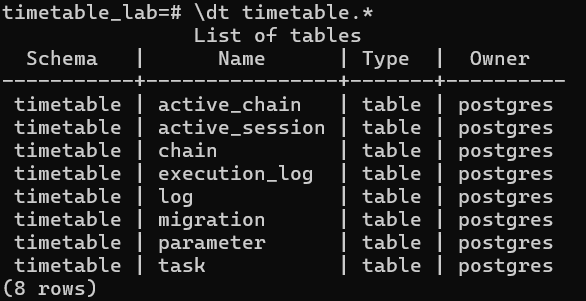
Pg_timetable Schema:
- timetable.chain – Stores the chains or workflows that
pg_timetableneeds to execute. - timetable.task – Stores the individual tasks belonging to a chain, including task order, SQL/commands, database connection, and error handling.
- timetable.active_chain – Stores information about chains that are currently active or running.
- timetable.active_session – Tracks active
pg_timetablesessions/workers involved in task execution. - timetable.execution_log- Stores the execution history and results of scheduled tasks.
- timetable.log – Stores
pg_timetablelog information, useful for monitoring and troubleshooting. - timetable.parameter – Stores parameters and configuration values used by chains and tasks.
- timetable.migration – Keeps track of database schema migrations and their versions.
Comparison table for pg_timetable with pg_cron:
| Feature | pg_timetable | pg_cron |
| Architecture | Standalone scheduler/client | PostgreSQL background worker |
| Year | 2019 | 2016 |
| Implementation Language | Go | C |
| Can operate without extension | Yes | No |
| Jobs metadata stored in | Database | Database |
| Remote Database Execution | Yes | No |
| Cross Platform | Yes | Yes |
| SQL Tasks | Yes | Yes |
| Program/Shell Tasks | Yes | yes |
| Built-in Tasks | Yes | No |
| Concurrency Protection | Yes | Yes |
| Task Parameters | Yes | No |
| Arbitrary Role | Yes | No |
| On Success Task | Yes | No |
| On Error Task | Yes | No |
| Standard Cron Scheduling | Yes | Yes |
| Interval Scheduling | Yes | Yes |
| Start Manually | Yes | No |
| Kill Running Job | Yes | No |
| Job Timeout | Yes | No |
| Task Timeout | Yes | No |
Conclusion :
pg_timetable is more than a simple cron replacement. It is a PostgreSQL job and workflow scheduler. It can schedule SQL and other supported task types, organize multiple tasks into chains, control concurrent execution, handle failures, support transactional workflows, and store scheduling and execution information in PostgreSQL. Compared with pg_cron, which is especially well suited for simple scheduled SQL jobs, pg_timetable is designed for more complex, multi-step database workflows.