
In today’s data-driven systems, high availability (HA) is no longer optional—it’s a fundamental requirement. Applications are expected to remain responsive even during node failures, maintenance windows, or unexpected outages. While native replication in MariaDB provides the foundation for redundancy, it does not, by itself, deliver seamless failover, intelligent traffic routing, or transparent scalability. This is where MariaDB MaxScale becomes a critical component in modern database architecture.
An HA architecture powered by MaxScale not only ensures continuous availability but also simplifies operational complexity. Applications no longer need to manage database topology changes, failover logic, or replica selection. Instead, MaxScale abstracts these responsibilities, providing a single entry point that dynamically adapts to the state of the backend cluster. This decoupling significantly improves maintainability and enables seamless scaling as demand grows.
This blog presents an end-to-end, hands-on guide to installing and configuring MariaDB MaxScale for a high availability setup. It is designed with a practical, production-oriented approach, covering key aspects such as environment prerequisites, installation steps, configuration of monitors and services, and validation of failover scenarios. By the end of this guide, you will have a robust, fault-tolerant MariaDB architecture capable of handling real-world workloads with minimal downtime and optimal performance.
What is MariaDB?
MariaDB is an open-source relational database management system (RDBMS) used to store, manage, and retrieve data. In simple terms, MariaDB is a software where applications store their data and retrieve it whenever needed.
How does MariaDB work?
The application sends a query (SQL command) to MariaDB. MariaDB processes the query and returns the result to the application.
For example, when the query SELECT * FROM users; is executed, MariaDB returns all the user data stored in the table.
Key Features of MariaDB
MariaDB is open-source and free to use. It provides high performance and strong security features. It supports replication (master-slave architecture), enables high availability, and is fully compatible with MySQL.
What is MaxScale?
MaxScale is a MariaDB smart proxy or router. It sits in front of the database, where the application communicates with MaxScale, and MaxScale then communicates with the database.
In a simple data flow example, when the application sends an INSERT query, it goes through MaxScale and is directed to the MariaDB Master. Similarly, when a SELECT query is sent, it passes through MaxScale and is routed to the MariaDB Slave. The application does not need to know where the query is going, as MaxScale automatically decides the routing.
Failover refers to the process that occurs when the Master database goes down or crashes. Without GTID (Global Transaction ID), failover is complex and requires manual handling using binlog file names and positions, which increases the risk of data loss. However, with GTID, failover becomes much easier and safer.
GTID assigns a unique identifier to every transaction in the database. This allows the Slave to track which transactions have been executed and which are missing. As a result, during a failure scenario, MaxScale can quickly detect the issue, promote a Slave to become the new Master, and redirect application traffic to it. This process does not require manual binlog calculations and only needs the configuration MASTER_USE_GTID = slave_pos.
Without GTID, replication management is complex, manual, and prone to errors, with a higher chance of data loss. In contrast, GTID simplifies the process, makes it automatic, safer, and significantly reduces the risk of data loss.
Data flow between app and databases
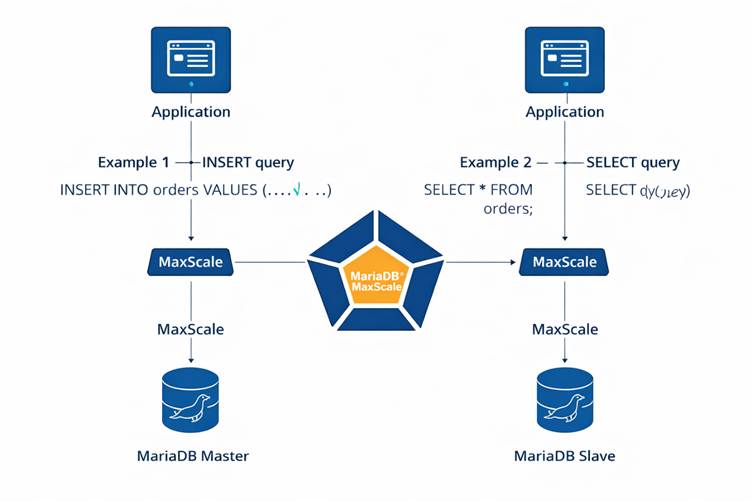
In this architecture, the application does not connect directly to the database. Instead, MaxScale acts as an intelligent middle layer that manages query routing. The MariaDB Master handles all write operations, while Slaves handle read operations. With GTID enabled, failover becomes safe, fast, and automatic.
It provides high availability and efficient read-write separation. MaxScale intelligently routes queries, the Master handles writes, Slaves handle reads, and GTID ensures reliable and seamless failover.
MaxScale Installation (Active & Passive)
What is MaxScale (Active) & MaxScale (Passive)?
- Active
MaxScale→ Accepts application requests and acts as the main working proxy. - Passive
MaxScale→ Works as a backup proxy and starts immediately if Active goes down. - Result → Even if
MaxScalecrashes, the system will not go down.
Step 1: Check if MaxScale repo is enabled
#Run
dnf repolist | grep -i maxscale- If you see no output, the
MaxScalerepo is not added. - MariaDB does not provide a separate working repo script only for
MaxScaleon Rocky Linux 9. - The official
MariaDBrepo setup script must be used. - This script adds both
MariaDBServer andMaxScalerepositories.
Step 2: Add the official MariaDB repository (Correct command)
#Run either one of the command:
curl -LsS https://downloads.mariadb.com/MariaDB/mariadb_repo_setup | bash

curl -O https://downloads.mariadb.com/MariaDB/mariadb_repo_setup
Step 3: Verify repositories
dnf repolist | grep -i mariadb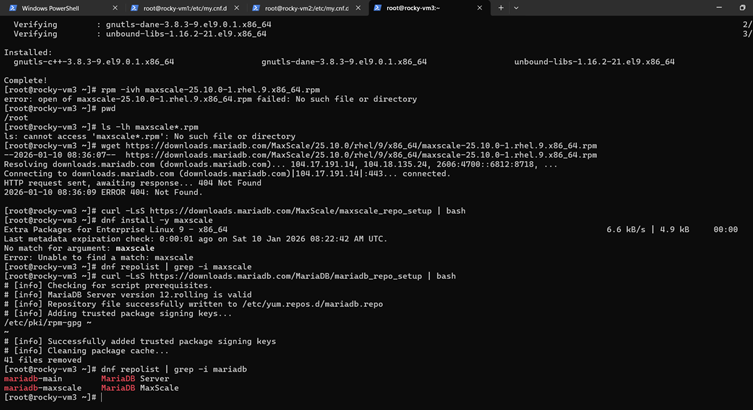
Step 4: Install MaxScale
Now install MaxScale:
dnf install -y maxscale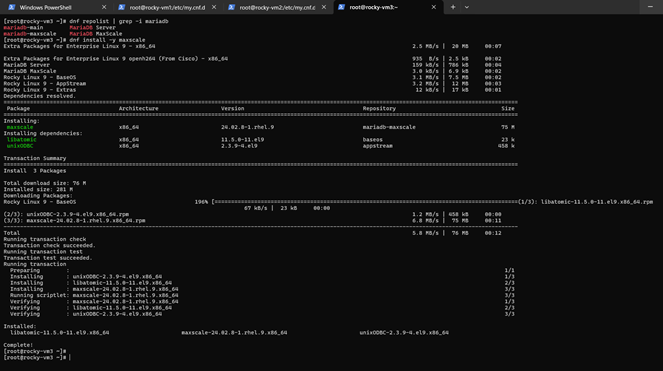
Step 5: Verify installed version
maxscale --versionsystemctl enable maxscale
systemctl start maxscale
systemctl status maxscaleStep 6: Enable and start MaxScale
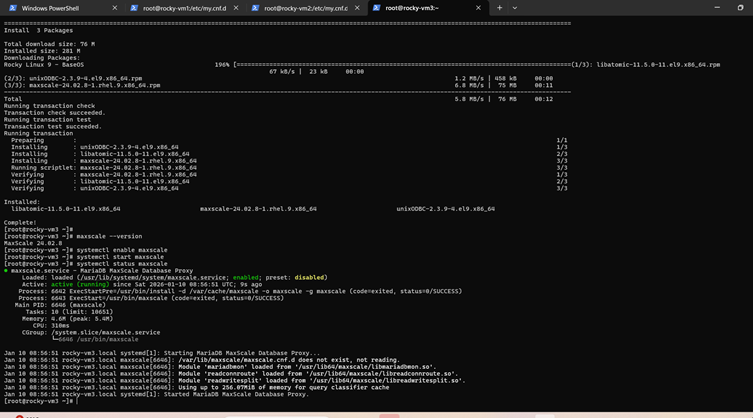
Step 7: Create MaxScale user on MASTER DB
CREATE USER 'maxscale'@'%' IDENTIFIED BY 'maxscale';
GRANT SELECT ON mysql.* TO 'maxscale'@'%';
GRANT SHOW DATABASES, REPLICATION CLIENT, REPLICATION SLAVE ON *.* TO 'maxscale'@'%';
FLUSH PRIVILEGES;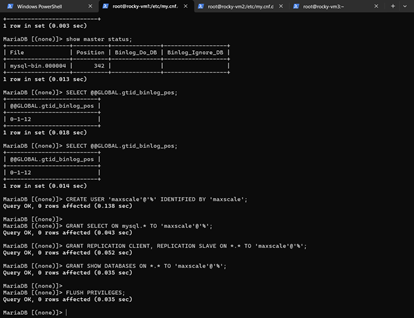
Step 8: MaxScale config
[server1]
type=server
address=192.168.56.21
port=3306
protocol=MariaDBBackend

[server2]
type=server
address=192.168.56.22
port=3306
protocol=MariaDBBackend
[MariaDB-Monitor]
type=monitor
module=mariadbmon
servers=server1, server2
user=maxscale
password=maxscale
auto_failover=true
auto_rejoin=true
monitor_interval=2000ms

[Read-Write-Service]
type=service
router=readwritesplit
servers=server1, server2
user=maxscale
password=maxscale@1234

[Read-Write-Listener]
type=listener
protocol=MariaDBClient
service=Read-Write-Service
port=4006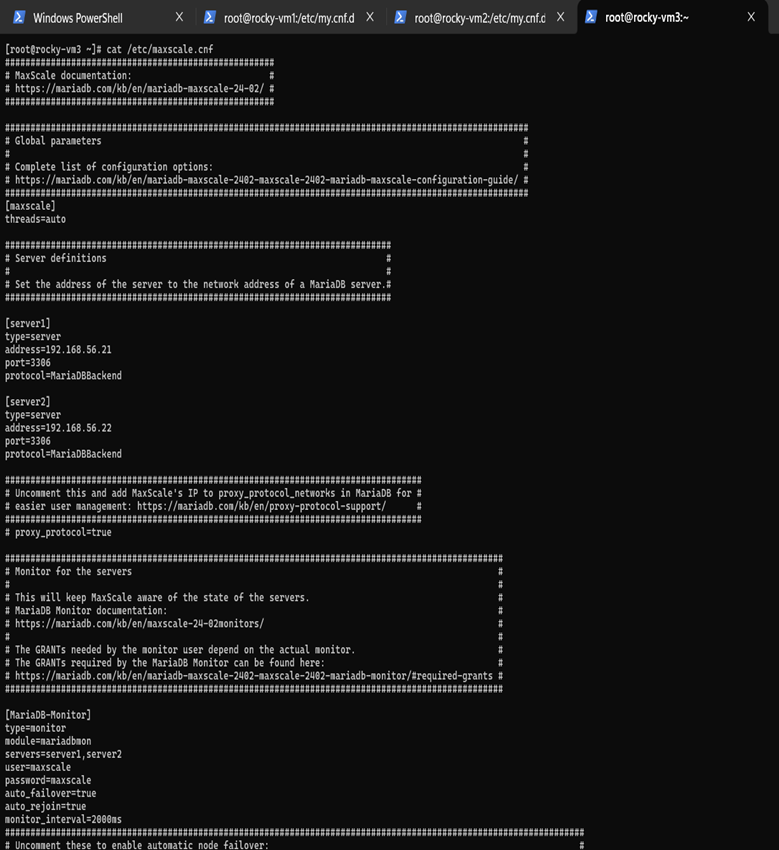
Step 9: Restart MaxScale
service maxscale restart (or)
systemctl restart maxscale
systemctl status maxscale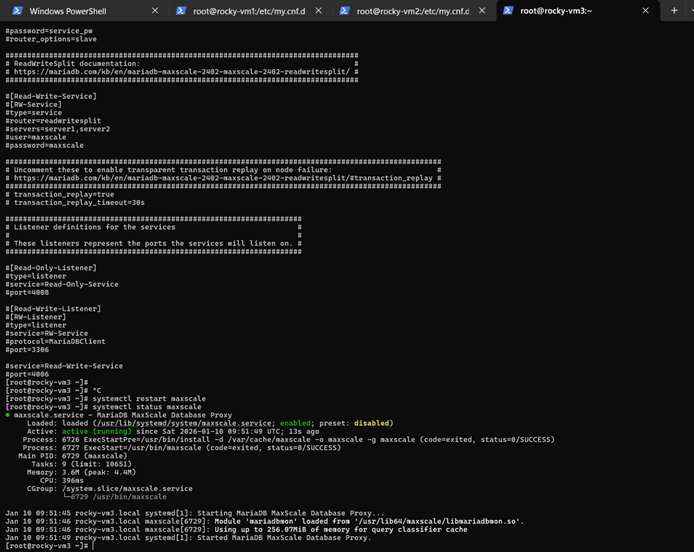
Step 10: Verification
Let’s verify by checking the list of the server using maxctrl utility.
maxctrl list servers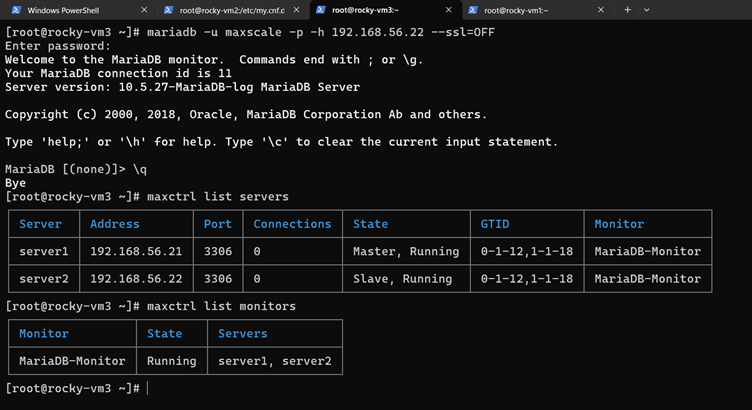
Let’s explore how to use MaxScale efficiently by understanding its pros and cons.
What Makes MaxScale Powerful?
MaxScale is not just a simple proxy—it is a SQL-aware, intelligent database gateway. It understands queries and routes them accordingly, making it highly efficient for complex database environments.
Advantages of MaxScale
1. Smart Read/Write Splitting
One of MaxScale's biggest strengths is its ability to automatically split read and write operations.
- Read queries (
SELECT) → sent to replicas - Write queries (
INSERT/UPDATE) → sent to primary
This reduces load on the primary database and improves overall performance.
2.High Availability with Automatic Failover
MaxScale continuously monitors database nodes.
- If the primary node fails, it automatically promotes a replica
- Traffic is rerouted without application changes
This ensures minimal downtime and seamless operations.
3.Efficient Load Balancing
MaxScale distributes incoming queries across multiple database servers.
- Prevents overload on a single node
- Improves system scalability
Ideal for high-traffic applications and production systems.
4.Decoupling Application from Database
Applications connect only to MaxScale—not directly to the database.
This abstraction allows:
- Easier infrastructure changes
- Seamless upgrades and migrations
5.Enhanced Security Layer
MaxScale can act as a database firewall.
- Blocks suspicious queries
- Mask sensitive data
- Filters traffic
Adds an extra layer of protection to your database.
6. Extensible and Modular Design
MaxScale supports plugins such as:
- Routers
- Filters
- Monitors
This flexibility allows customization based on business needs.
7.Connection Management & Performance Optimization
With connection pooling and optimized routing:
It reduces database connection overhead and improves response times.
Disadvantages of MaxScale
1.Limited to MySQL/MariaDB Ecosystem
MaxScale is designed specifically for MySQL and MariaDB databases.Not suitable for:
PostgreSQLOracleMulti-database environments
2.Complex Configuration
Setting up MaxScale requires a good understanding of:
- Replication topology
- Routing rules
- Query behavior
Note: Misconfiguration can lead to incorrect routing or data inconsistency.
3.Learning Curve
- Advanced features like filters and failover mechanisms are not beginner-friendly.
- DBAs need hands-on experience to use it effectively.
4.Licensing Constraints
While earlier versions were more open, some advanced features are now part of enterprise editions.This can increase costs for organizations.
5.Additional Latency Layer
Since MaxScale sits between the application and the database, it introduces a slight latency overhead compared to direct connections.
6.Troubleshooting Complexity
Debugging issues can be challenging:
- Query routing problems
- Failover inconsistencies
- Log analysis
- Requires deeper expertise and time.
7.Edge Case Limitations
Certain scenarios can be tricky:
- Prepared statements
- Long-running transactions
- Session state tracking
Note: These need careful handling to avoid unexpected behavior.
Final Thoughts
MariaDB MaxScale is a powerful tool when used correctly. It significantly improves scalability, availability, and security in database environments.
However, to use it efficiently:
- Proper configuration is crucial
- Monitoring and testing are essential
- Understanding workload patterns is key
If implemented thoughtfully, MaxScale can become a core component of a highly resilient and scalable database architecture.